
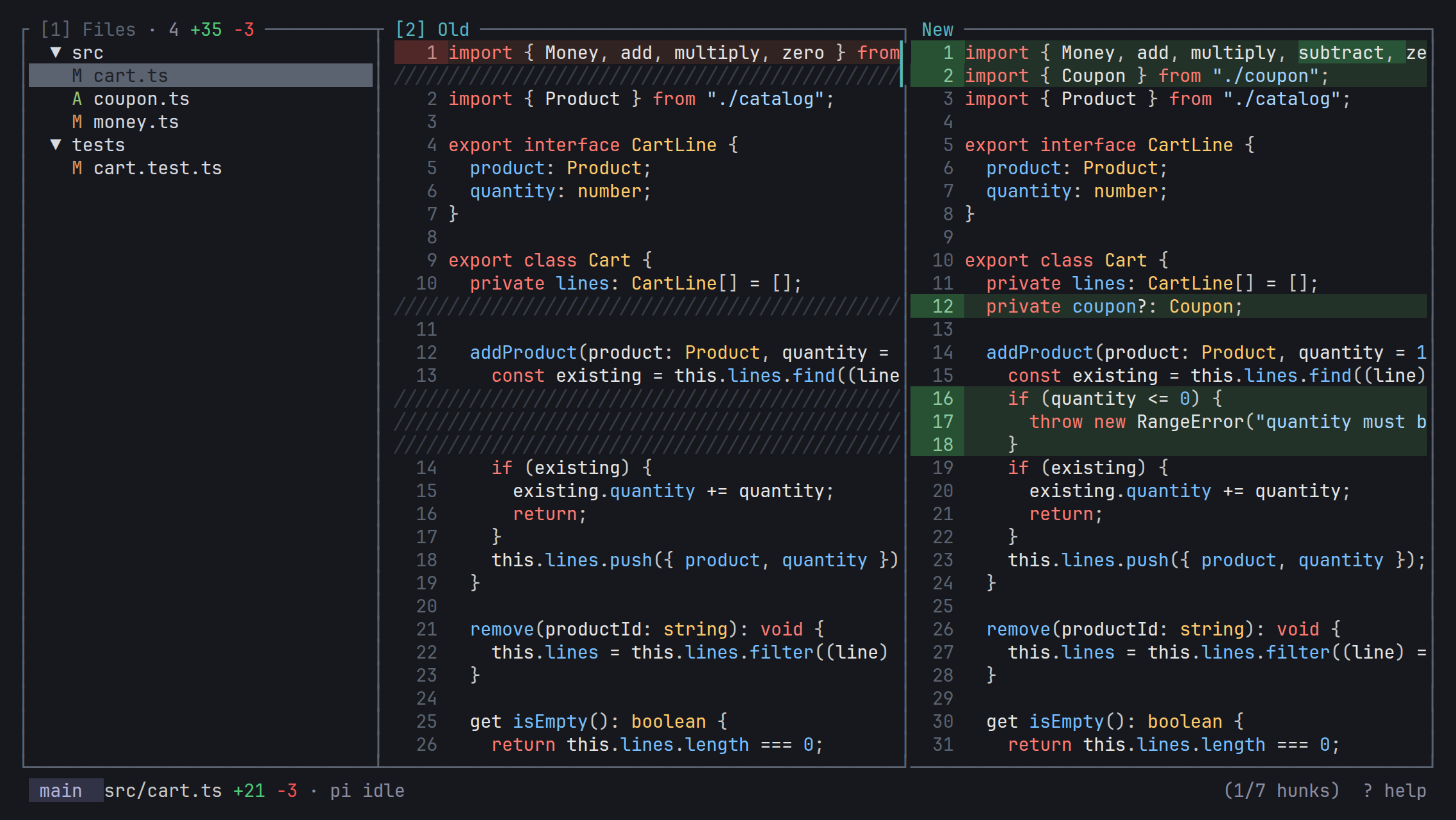
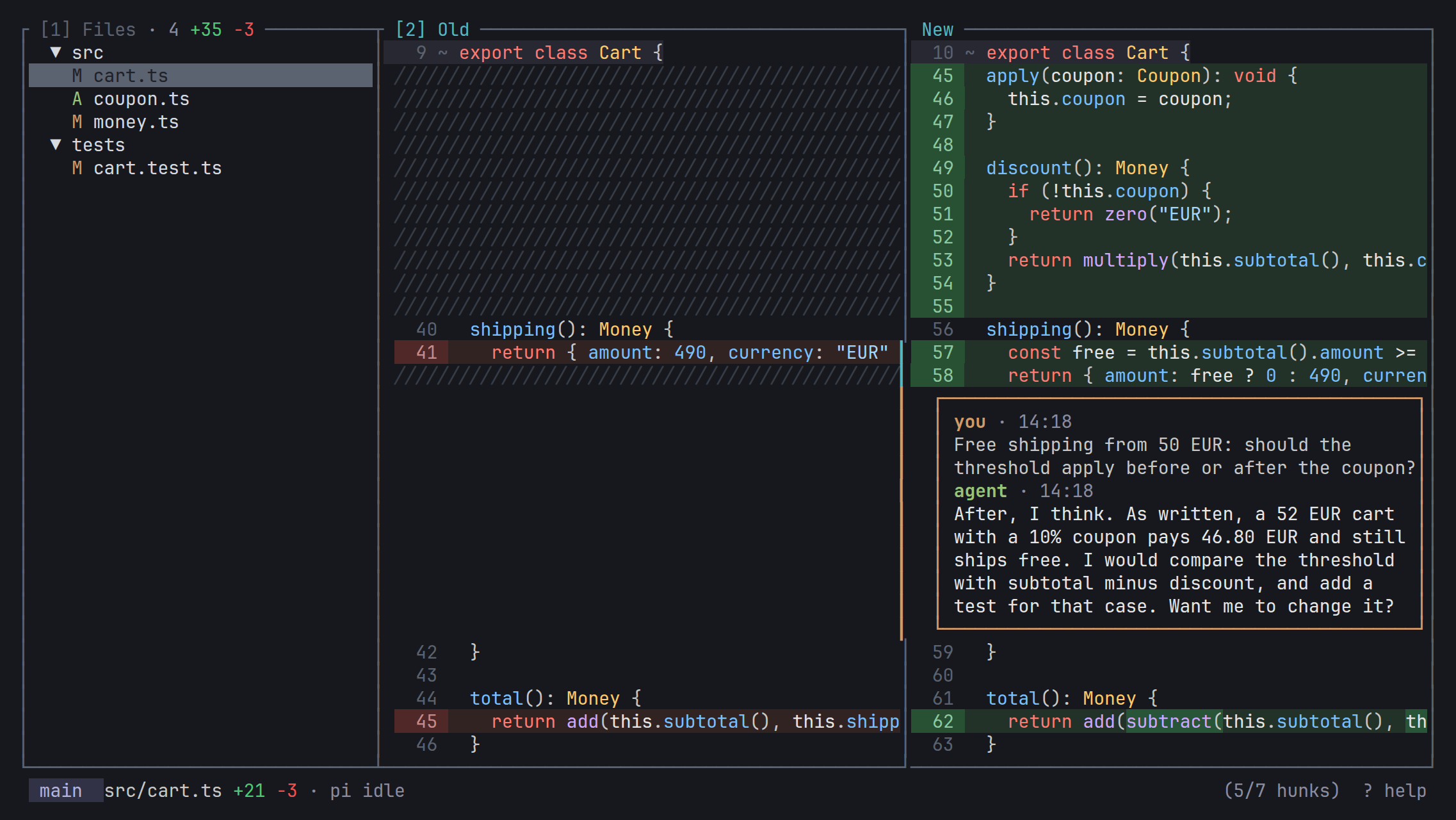
Lumiere is a high-performance, side-by-side terminal diff viewer written in Rust. It is built for the modern code-review loop with coding agents: inspect uncommitted changes, feature branches, commit ranges, or GitHub pull requests, leave inline threaded comments directly on hunks or line selections, and converse with your agent inside the same thread without ever leaving the review.
What makes Lumiere different
- Built around review threads, not one-way notes. Start a thread on a mouse selection, a focused hunk, or an entire file. Send comments immediately (Enter) or queue a batch (Alt+Enter / Ctrl+S) and dispatch them together (s). Your agent replies via
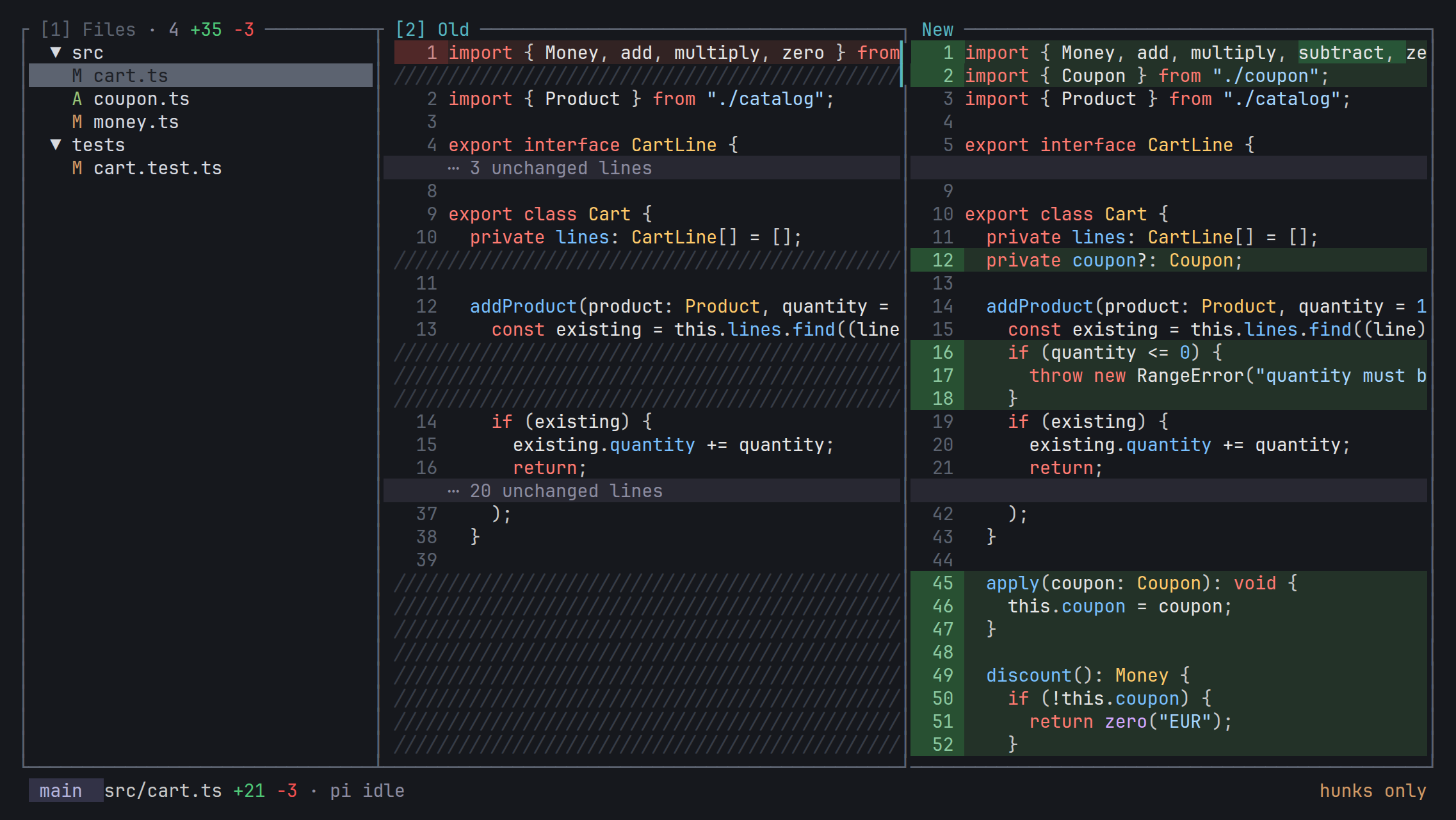
lumiere thread reply, and its response appears live inside the open TUI. - Hunks-only by default, full file one key away. Just like GitHub PR reviews, Lumiere opens focused on changes with three context lines around every hunk. Lines anchored by review threads remain visible even when far from a diff hunk.
- Multi-repository workspaces. Run
lumiere diffin a folder containing several repositories (such asapi/andweb/). Switch between them with R while preserving each repository's threads, viewed markers, and scroll position, and send queued feedback across all repositories in one message. - Git and Jujutsu native. Backed directly by
libgit2(vendored) andjj-lib— no shelling out togit diffon every keystroke. - Designed for speed and zero idle cost. Lazy per-language Tree-sitter grammar compilation, cached diff metrics, non-blocking background Rex discovery, and event-driven redraws keep startup fast and idle watch CPU at ~0%.
Where to go next
- New to Lumiere? Start with Installation and the Quick Start.
- Want to connect your coding agent? Read Review Threads and Coding Agents & Rex Integration.
- Looking for flags, themes, or keys? Jump to the CLI Reference, Configuration & Themes, or Keybindings.
- Curious how it is built? Read Architecture & Core Primitives.
Origin & License
Lumiere started as a fork of Lumen v2.32.0 by Sahaj Jain and is now independently developed and architected around threaded agent reviews, workspace reviews, and high-performance TUI primitives. Licensed under the MIT License.
Installation
Lumiere targets Linux and macOS and requires Rust 1.89 or later when building from source.
Install with Cargo
Install the latest version directly from GitHub:
cargo install --git https://github.com/aduverger/lumiere --locked
Or from a local clone:
git clone https://github.com/aduverger/lumiere.git
cd lumiere
cargo install --path . --locked
Both commands place the lumiere binary in ~/.cargo/bin.
Building without Jujutsu (jj-lib)
Jujutsu support is enabled by default via the jj Cargo feature. If you only use Git and want a smaller binary and faster compile time, build with --no-default-features:
cargo install --path . --locked --no-default-features
Pre-built binaries
Tagged releases publish pre-built archives and SHA-256 checksums on the GitHub Releases page for:
x86_64-unknown-linux-gnuaarch64-apple-darwin(Apple Silicon)x86_64-apple-darwin(Intel macOS)
Nix Flake
If you use Nix with flakes enabled:
nix run github:aduverger/lumiere -- diff
Or install it into your profile:
nix profile install github:aduverger/lumiere
Optional integrations
| Tool | Needed for |
|---|---|
GitHub CLI (gh) | Reviewing GitHub PRs via --pr / --detect-pr and syncing file viewed checkboxes |
| Rex | Live two-way review threads with coding agents running in sibling terminal panes |
| pi | The /lumiere slash command inside pi (see below) |
Installing the pi extension
If you use the pi coding agent, symlink pi-extension/ once from your checkout and run /reload inside pi:
ln -s "$(pwd)/pi-extension" ~/.pi/agent/extensions/lumiere
See Coding Agents & Rex Integration for how /lumiere behaves inside and outside Rex.
Quick Start
Run lumiere diff from any directory inside a Git or Jujutsu repository (or from a parent workspace folder containing several repositories).
Common starting commands
# Uncommitted working-tree changes
lumiere diff

# Everything added on your feature branch, including uncommitted edits
lumiere diff origin/main...-

# Reload automatically whenever you or your agent edit files
lumiere diff origin/main...- --watch

# Review a range of commits one commit at a time
lumiere diff main..feature --stacked

# Review a GitHub pull request (requires `gh`)
lumiere diff --pr 123
lumiere diff --detect-pr
A 60-second review workflow
-
Move between files and hunks.
- Press Alt+Down / Alt+Up (or Opt+k / Opt+j on macOS) to step between files, or Ctrl+P for the fuzzy file picker.
- Press ] and [ to jump between hunks. Press m to dim a hunk as reviewed and advance to the next one.
- Press z at any time to toggle between hunks-only view and the full file.
-
Search across the diff.
- Press / to search incrementally in the current file (n/N to step through matches).
- Press Ctrl+F for Telescope-style fuzzy search across every file in the diff with a live syntax-highlighted preview pane.
-
Start a review thread.
- Focus a hunk with ] / [, or click-and-drag with the mouse to select specific lines or characters.
- Press i to open the inline comment editor.
- Press Enter to save and send immediately to your attached coding agent, or Alt+Enter (Ctrl+S) to queue the comment for later batch sending.
-
Review responses live.
- When an agent runs
lumiere thread reply <id> --body '...', Lumiere detects the file update and renders the reply live in your diff view. - Press t on any thread (or click a
⋯truncation row) to open the full scrollable thread modal with Markdown formatting and syntax-highlighted code snippets. - Press x to resolve a thread once satisfied.
- When an agent runs
-
Mark files viewed and finish.
- Press Space in the diff view to mark the current file as viewed and jump to the next unviewed file.
- Press s to send all queued comments as a single message (or export them to stdout when no agent is attached).
- Press q to quit, or ? at any time to inspect the full keybinding sheet.
Review Targets & References
lumiere diff accepts a wide set of Git, Jujutsu, and GitHub pull request targets. You can invoke it from any subdirectory of a repository.
Revision reference syntax
| Reference | Meaning | Typical use |
|---|---|---|
| (none) | Working tree vs parent (HEAD in Git, @- in Jujutsu) | Review uncommitted changes |
SHA / REF | Single commit vs its parent | Inspect one commit |
A..B | Tree diff from A to B | Compare two commits or branches directly |
A...B | Tree diff from merge-base(A, B) to B | Compare a branch tip against where it forked |
A..- | Tree diff from A to the current working tree | Compare everything from A including uncommitted edits |
A...- | Tree diff from merge-base(A, HEAD) to the working tree | Best for feature branches — ignores commits added to A after you branched |
Why
origin/main...-? Whenorigin/mainadvances while you work on a feature branch,origin/main..-starts showing changes other teammates merged intomain. Using three dots (origin/main...-) computes the merge base with your current commit and compares it to your live working tree, so you always review only your branch plus uncommitted changes.
Watch mode (--watch / -w)
Pass --watch (or toggle it interactively with w) to reload automatically when files change on disk or when Git writes refs/index updates during a commit or checkout:
lumiere diff origin/main...- --watch
- Changes are gathered over a 500 ms debounce window so rapid saves or formatter passes collapse into a single reload.
- Files that change on disk are automatically unmarked as viewed so you never miss new edits by an agent or formatter.
- On Linux, the watcher walks the repository and skips directories ignored by Git (such as
node_modules/,.venv/, andtarget/), avoidinginotifywatch exhaustion and startup delays. - Watch mode is unavailable in GitHub PR mode (
--pr/--detect-pr).
Stacked commit review (--stacked)
Review a multi-commit branch one commit at a time:
lumiere diff main..feature --stacked
lumiere diff main...feature --stacked
- A compact header bar displays the VCS (
gitorjj), commit index (1/6), commit ID (plus shortchange_idin Jujutsu), and commit summary. - Press Ctrl+L / Ctrl+H (or click
‹/›in the header) to step forward and backward through commits. - Empty commits are automatically filtered out.
- Viewed-file checkboxes are remembered independently per commit SHA while switching back and forth.
GitHub pull requests (--pr / --detect-pr)
Review a GitHub PR without checking out its branch locally (requires an authenticated gh CLI):
# By PR number (uses origin remote, or override with --origin owner/repo)
lumiere diff --pr 123
lumiere diff 123

# By full URL
lumiere diff --pr https://github.com/owner/repo/pull/123
lumiere diff https://github.com/owner/repo/pull/123

# Auto-detect the PR for the current branch
lumiere diff --detect-pr
- Base and head file contents are fetched in parallel (bounded to 8 concurrent
gh apiworkers to stay comfortably below GitHub secondary rate limits). - Fork PRs (including PRs whose fork repository has since been deleted) are supported cleanly.
- File viewed status (
Space) syncs bidirectionally with GitHub's "Viewed" checkboxes via GraphQL mutations. - Press o to open the current file directly in your browser at its exact
#diff-<sha256>anchor on GitHub.
Filtering and focusing files
# Limit the review to specific paths
lumiere diff -f src/lib.rs -f src/ui/mod.rs

# Open with a specific file selected first
lumiere diff --focus src/ui/mod.rs
Git and Jujutsu (--vcs)
Lumiere automatically detects whether the directory is a Jujutsu repository (.jj), a colocated Jujutsu+Git repository (prefers Jujutsu by default), or a Git repository (.git). Override auto-detection with the global --vcs flag before diff:
lumiere --vcs git diff
lumiere --vcs jj diff @---..@
In Jujutsu repositories, Lumiere also prints helpful translation hints if Git-style refs such as HEAD~2 are accidentally supplied (@---).
Navigating Diffs
Lumiere presents a collapsible file tree on the left ([1] Files) and a side-by-side diff canvas ([2] Old / New) on the right, backed by a status footer.
Hunks-only vs. full-file view
By default, Lumiere opens in hunks-only mode: each changed hunk is displayed with 3 lines of surrounding context, and untouched sections collapse into compact separator rows (⋯ 63 unchanged lines).
- Press z to toggle between hunks-only and full-file mode at any time. Lumiere anchors the focused hunk (or top visible line) in place so your eye never loses its spot.
- Lines anchored by a review thread are never folded away, even when far from any changed hunk.
- Added files and deleted files automatically render in a clean single-panel layout (
[2] New File/[2] Deleted File) in both modes. - Set
"view": "full"inlumiere.config.jsonor pass--view fullif you prefer whole files by default.
Panel layout and line wrapping
- Tab toggles the file tree sidebar on and off.
- 1 focuses the sidebar; 2 focuses the diff view.
- 0 toggles fullscreen Old panel; - toggles fullscreen New panel; = returns to side-by-side.
- Pass
--wrap(or"wrap": truein config) to soft-wrap long lines with preserved leading indentation rather than scrolling horizontally (h / l).
Moving through files and hunks
- Jump between files: Alt+Down / Alt+Up, Alt+K / Alt+J, or Ctrl+K / Ctrl+J.
- Fuzzy file picker: Press Ctrl+P to filter changed files by path.
- Step between hunks: Press ] (next hunk) and [ (previous hunk). A focused vertical bar (
▎) highlights the active hunk. - Mark progress:
- Press m in the diff view to mark the focused hunk as viewed (dimming its diff tint while keeping its gutter colored) and automatically advance to the next hunk.
- Press Space in the diff view to mark the current file viewed (
✓) and jump directly to the next unviewed file. - In the sidebar, Space toggles viewed status on a file or recursively on an entire directory; Enter opens a file or collapses/expands a directory.
Sticky scope context
When scrolling inside a function, class, impl block, or method in supported languages (Rust, Python, TypeScript, JavaScript, Go, C, C++, Java), Lumiere pins enclosing scope headers at the top of each panel (12 ~ fn render_diff(...)) using Tree-sitter AST queries.
Large files (> 1 MB): Files over 1 MB skip whole-file Tree-sitter parsing and sticky context headers to keep navigation instantaneous. Lines are still syntax-highlighted on demand line by line, and the footer displays
large file: colours are approximate.
In-file search (/) and global fuzzy search (Ctrl+F)
| Mode | Trigger | Scope | Navigation |
|---|---|---|---|
| In-file search | / | Lines currently visible in the active file | Enter confirms, n/N or ↓/↑ step matches, Esc clears |
| Global fuzzy search | Ctrl+F | All lines across every changed file | Telescope-style 50/50 split with fuzzy matching (nucleo-matcher) and syntax-highlighted unified preview |
In Global fuzzy search:
- Type to fuzzy-filter across
filename:line content. - Move with ↓/↑, Ctrl+N/Ctrl+P, PageUp/PageDown, or mouse click/wheel. Hold Shift + scroll wheel to pan either pane horizontally.
- Press Enter to jump straight to that file and line. If the target line was folded in hunks-only view, Lumiere automatically switches to full-file view so the match lands cleanly on screen.
Mouse selection, copying, and external editor
- Character selection: Click and drag anywhere in the code area of either panel.
- Line selection: Click and drag inside the line-number gutter.
- Actions on selection: Release the mouse to see the inline action bar (
i annotate y copy esc). Press y to copy the selected text (or the current filename when nothing is selected) to the system clipboard. - Open in
$EDITOR: Press e to open the current file in$EDITOR(defaultvim), jumping to the focused hunk's line number (+<line>).$EDITORsupports shell-style arguments such ascode --wait.
Review Threads
Review threads are the heart of Lumiere. Instead of copying line numbers into a chat window and losing context, you attach threaded discussions directly to the diff and let your coding agent reply right back inside Lumiere.
Anchoring targets
When you press i to comment, Lumiere picks the target automatically using a clear precedence order:
- Active mouse selection — attaches to the selected line range on the selected panel (
OldorNew). - Focused hunk — if no lines are selected, attaches to the changed lines of the focused hunk (
Newside by default,Oldside for pure deletions or when viewing only the Old panel via 0). - Whole file — if neither lines nor a hunk are focused, attaches a file-level thread pinned at the top of the diff.
If an open thread already overlaps the target lines, pressing i continues that thread (editing your unsent draft if one exists, or starting a reply if everything was already sent). Clicking an inline thread box also opens the reply/draft editor directly.
Writing, sending, and queueing comments
Inside the inline comment editor:
| Key | Action |
|---|---|
| Enter | Save the comment and send it immediately to the attached agent |
| Alt+Enter or Ctrl+S | Save the comment as queued (not sent yet) |
| Shift+Enter or Ctrl+J | Insert a newline |
| Ctrl+U / Cmd+Backspace | Delete back to start of line |
| Esc or Ctrl+C | Cancel without saving |
- Clicking outside the inline editor saves a non-empty draft as queued (or deletes an emptied existing draft).
- While a comment is queued, it is marked
· queuedin the thread box and counted in the footer (· 3 queued). Queued comments stay private from the agent until you send them with s. - If no agent is attached, Enter queues the comment instead, and pressing s prompts to exit Lumiere and write all queued comments to
stdoutin GitHub-style Markdown (for piping or the non-Rexpiintegration). - Pressing q with queued comments still unsent prompts you to send/export them, exit keeping them queued for later, or cancel.
Reading long threads and Markdown formatting
Inline thread boxes stay compact so they never overwhelm the diff:
- Older comments fold into
⋯ N earlier comments (t to view). - Very long single comments fold trailing lines into
⋯ N more lines (t to view). - Press t on a thread (or click any
⋯indicator row) to open the focused Thread View modal:- Displays up to 8 lines of syntax-highlighted anchored code at the top.
- Renders full CommonMark comments including headings, bold, italic,
strikethrough, bullet/numbered/task lists, blockquotes, links, inline code, and fenced code blocks highlighted with Tree-sitter (falling back to the reviewed file's language when a fence is untagged). - Opens pinned to the latest reply; scroll with j/k, arrows, PageUp/PageDown, Home/End/G, or the mouse wheel.
- Press i inside the modal to dock the reply editor at the bottom while keeping the conversation readable above.
Resolving and browsing threads
- Press x on a thread (in the diff view, the thread modal, or the threads list) to resolve or reopen it. Resolved threads collapse to a single muted line (
✓ resolved · author: ...). Replying to a resolved thread automatically reopens it. - Press I to open the Threads list across the current repository:
- By default, resolved threads are hidden (
Threads (2) · 3 resolved hidden). Press r to toggle showing resolved threads. - Press Enter to open the focused Thread View (dismissing returns to the list), g to jump straight to the thread's lines in the diff, e to jump and open the inline editor, x to resolve/reopen, or d to delete.
- By default, resolved threads are hidden (
Persistence and outdated tracking
Threads are persisted outside your Git working tree in ~/.local/state/lumiere/<repo-hash>/threads.json (respecting XDG_STATE_HOME on Linux and ~/Library/Application Support/lumiere/ on macOS):
- Threads are shared across all diff ranges reviewed in the same repository and survive restarts.
- External replies written by
lumiere thread replyare picked up automatically by the running TUI without manual refresh. - Whenever the diff reloads, Lumiere re-anchors every line-range thread:
- If the exact anchored snippet still matches the same line range, nothing changes.
- If lines shifted up or down, Lumiere relocates the thread if the snippet matches at exactly one location on the same panel side.
- If the snippet was edited, deleted, or matches ambiguously, the thread is marked
outdatedwhile preserving its conversation history.
Coding Agents & Rex Integration
Lumiere turns code review into a live back-and-forth loop with coding agents running alongside it in Rex terminal panes — and still works seamlessly without Rex via stdout export or the pi extension.
How live agent discovery works
When you open lumiere diff, Lumiere spawns a background worker that queries Rex (never blocking your first keystrokes):
- It enumerates Rex sessions and terminal panes.
- It looks for panes whose foreground process matches a known coding agent reporting Rex OSC 7501 program status and whose working directory is at or inside the reviewed repository (or workspace root).
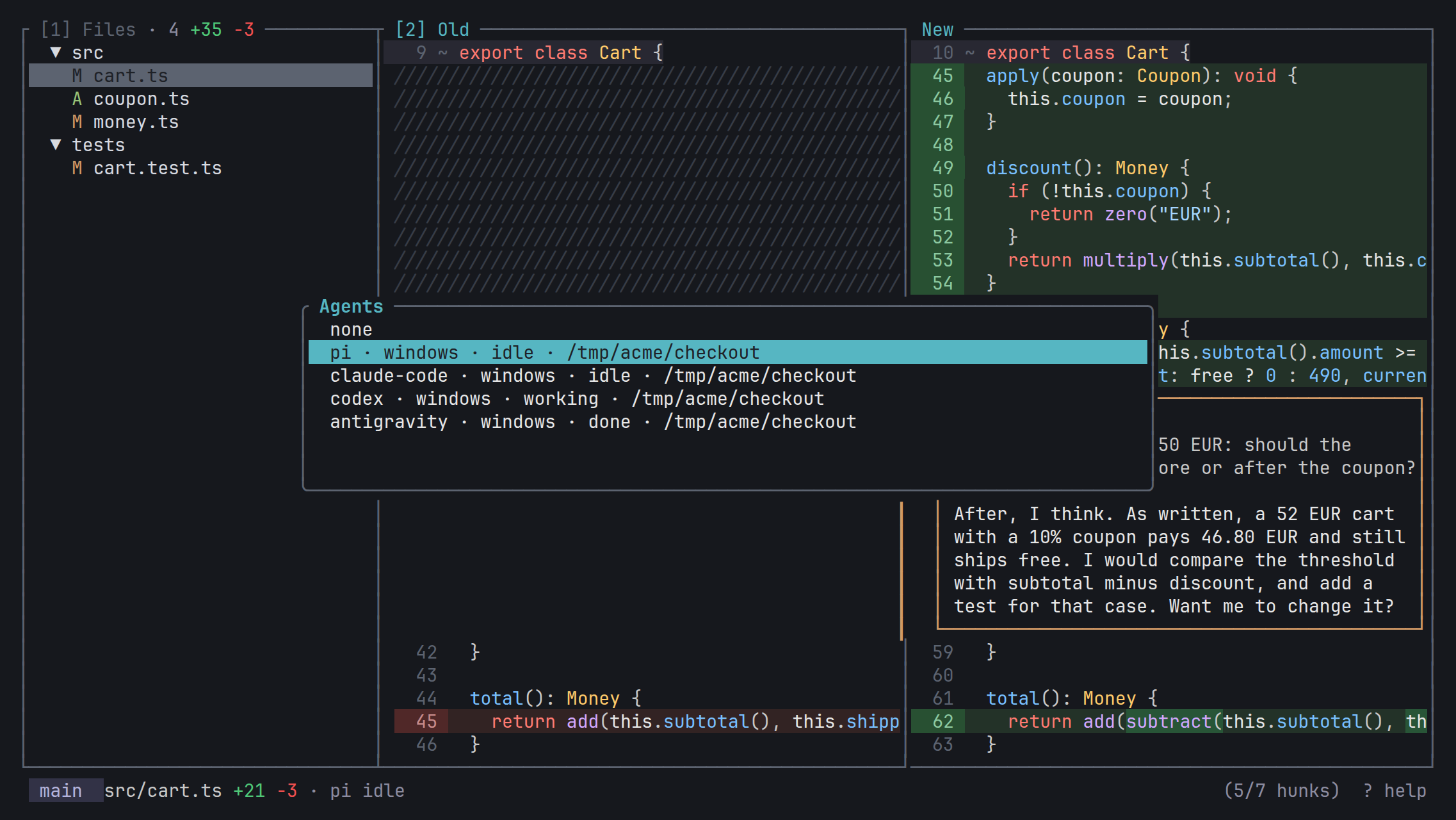
- It attaches to the most recently active matching agent pane and shows its name and state in the footer (for example,
· pi idleor· codex working). - Every 3 seconds, the background worker refreshes the attached pane's status without stalling the UI.
Recognized agents
An agent is discovered automatically when it reports Rex program status with a matching foreground PID:
- Tested:
pi,claude-code,codex(0.163+),antigravity - Recognized by name:
opencode,hermes,grok,grok-build
Press A at any time to open the Agents picker, switch to another running agent pane, or choose none to detach. You can also target an explicit pane or terminal ID at startup with --agent-target <TARGET> (or the --agent-block alias for Rex).
Safety guards before sending
Lumiere enforces strict safety checks right before pasting comments into a terminal pane:
- Foreground PID verification: A pane only counts as an active agent if the status record's
owner_pidequals the pane's currentforeground_pid. If the agent exited back to your shell, Lumiere drops the attachment and refuses to paste into your shell. - Blocked-state check: If the agent's Rex status is
blocked(e.g., waiting for tool permission or confirmation), Lumiere leaves your comments queued and notifies<agent> is waiting for you, preventing accidental submission of a permission prompt. - Bracketed paste & control-character sanitization: Comments are wrapped in ANSI bracketed paste (
\x1b[200~...\x1b[201~) and stripped of all control characters other than\n, so multi-line messages never trigger premature submission or escape the paste boundary.
What the agent receives and how it replies
When you send one or more comments, Lumiere delivers a structured prompt containing:
- Each thread's ID, file path, line range, side (
LEFT/RIGHT), and (for the first comment on a thread) the anchored code snippet. - Instructions asking the agent to reply inside the thread first (and wait for your approval before editing code).
- The exact
lumiere thread replycommand to run (using the full executable path iflumiereis not shadowed onPATH, and includinglumiere thread showwhen continuing a thread with earlier comments).
Agents interact with review threads using three CLI subcommands:
# List threads that have been sent to the agent (--awaiting filters to ones waiting for a reply)
lumiere thread list [--awaiting] [--json] [--repo PATH]

# Inspect full history and anchored code for one thread
lumiere thread show <thread-id> [--json] [--repo PATH]

# Post a reply into the thread (immediately reflected in the open Lumiere UI)
lumiere thread reply <thread-id> --body "Agreed — I can extract that helper." [--repo PATH] [--author NAME]
echo "Multiline reply" | lumiere thread reply <thread-id> --stdin [--repo PATH]
Privacy of drafts: Queued comments that you have not sent yet are invisible to
lumiere thread list,show, andreply. Resolved threads reject new agent replies until you reopen them.
Using /lumiere inside pi
After symlinking pi-extension/ into ~/.pi/agent/extensions/lumiere and running /reload:
/lumiere                    # runs: lumiere diff origin/main...- --watch
/lumiere diff HEAD~3..-     # passes any custom lumiere arguments
- Inside Rex:
/lumiereopens Lumiere in a zoomed split pane besidepi, passing--agent-blockautomatically so comments flow straight to thatpisession whilepistays active behind the zoom. Unzoom the pane to view both side by side. - Outside Rex:
/lumieretemporarily suspendspi's TUI while you review. Leave comments, then press s and Enter to exit and hand the formatted review directly topias a user message. Pressing q discards sending.
Set LUMIERE_BIN=/path/to/lumiere if your lumiere binary is not on PATH.
Multi-Repository Workspaces
When a feature spans multiple repositories — such as an api/ backend and a web/ frontend checked out under a shared folder — you can review them all in one Lumiere session.
Starting a workspace review
Run lumiere diff from a parent folder that is not itself a Git or Jujutsu repository, but contains repositories as immediate subdirectories:
cd ~/code/my-project     # contains api/, web/, shared/
lumiere diff origin/main...- --watch
Discovery rules
- Only immediate child directories containing
.gitor.jjare discovered, sorted alphabetically by directory name. - Plain folders without a VCS marker and symlinked directories are ignored.
- Lumiere opens the first repository (by name) that has changes for the requested reference, or the first reviewable repository if all are clean.
- If a repository lacks the requested revision (for example,
origin/maindoes not exist in one repo), it remains visible in the repository picker and displays the error if selected.
Switching repositories and managing state
- Press R to open the Repositories picker. It marks the current repository, shows thread counts for every opened repository, and flags unavailable repositories.
- The footer prefixes the current branch or reference with the repository name (
api · origin/main...-). - Switching repositories parks the previous repository's full
AppStatein memory — preserving its open threads, viewed files, viewed hunks, collapsed directories, and scroll position. - Watch mode (w) follows the repository currently on screen; returning to a parked repository while watch mode is enabled triggers a fresh reload so edits made while off-screen are picked up.
Threads and agents across a workspace
- Per-repository storage: Each repository keeps its own
threads.jsonunder Lumiere's state directory. - Combined sending: Pressing s sends (or exports) queued comments across every repository opened in the session, grouped under
# Repository: <name> (<absolute-path>)headings. - Agent discovery: Lumiere searches Rex for agents working in the workspace folder or any discovered repository root (or subdirectories thereof).
- Agent CLI:
lumiere thread list,show, andreplywork seamlessly from the workspace folder (--repo ~/code/my-project) — locating threads by ID across all child repositories and showing each repository's name in listings.
Workspace limitations
--pr,--detect-pr, and--stackedrequire a single repository and report an error if run from a multi-repository workspace folder.- The threads list (I) shows threads for the repository currently on screen.
CLI Reference
lumiere [GLOBAL OPTIONS] <COMMAND>
Global options
Place global options before the subcommand (diff or thread):
| Flag | Description |
|---|---|
--config <PATH> | Path to a JSON config file (overrides ~/.config/lumiere/lumiere.config.json) |
--vcs <git|jj> | Force the version control backend instead of auto-detecting |
-h, --help | Print help |
-V, --version | Print version |
lumiere diff
Launch the interactive side-by-side diff viewer.
lumiere diff [OPTIONS] [REFERENCE]
Positional argument
| Argument | Description |
|---|---|
[REFERENCE] | Revision target (SHA, A..B, A...B, A..-, A...-), or a GitHub PR number/URL. Omit for uncommitted working-tree changes. |
Options
| Option | Description |
|---|---|
--pr <PR> | View a GitHub pull request by number or URL (conflicts with --detect-pr) |
--detect-pr | Auto-detect the GitHub PR associated with the current branch |
-f, --file <PATH> | Filter the diff to specific file paths (repeatable) |
-w, --watch | Watch the repository and auto-reload on file or VCS changes |
-t, --theme <NAME> | Override color theme (see Configuration & Themes) |
--stacked | Review a commit range (A..B or A...B) commit by commit |
--focus <PATH> | Start with the specified file selected |
--origin <OWNER/REPO> | GitHub owner/repo override when --pr is given as a number |
--wrap | Soft-wrap long diff lines instead of horizontal scrolling |
--view <hunks|full> | Initial view mode (hunks default, full for whole files) |
--agent-target <TARGET> | Explicit target pane or terminal ID of the coding agent to attach to (alias: --agent-block) |
lumiere thread
Read and answer review threads stored by lumiere diff. Works from a single repository or a multi-repository workspace folder.
lumiere thread list
lumiere thread list [--awaiting] [--json] [--repo <PATH>]
| Option | Description |
|---|---|
--awaiting | Show only open threads whose last sent comment is the reviewer's |
--json | Emit structured JSON instead of plain text |
--repo <PATH> | Repository or workspace folder path (default: current directory) |
lumiere thread show
lumiere thread show <THREAD_ID> [--json] [--repo <PATH>]
Displays the thread metadata, anchored code snippet, and all non-queued comments.
lumiere thread reply
lumiere thread reply <THREAD_ID> (--body <TEXT> | --stdin) [--repo <PATH>] [--author <NAME>]
| Option | Description |
|---|---|
--body <TEXT> | Reply body text (mutually exclusive with --stdin) |
--stdin | Read reply body from standard input |
--repo <PATH> | Repository or workspace folder path (default: current directory) |
--author <NAME> | Author label recorded on the reply (default: agent) |
Refuses to reply to unknown IDs, resolved threads, empty bodies, or threads that only contain unsent queued drafts.
Configuration & Themes
Configuration file
Lumiere reads ~/.config/lumiere/lumiere.config.json by default, or the path supplied with --config <PATH> before diff.
{
  "theme": "catppuccin-mocha",
  "wrap": false,
  "view": "hunks"
}
Supported keys
| Key | Type | Default | Description |
|---|---|---|---|
theme | string | auto-detected | Color theme name (see table below) |
wrap | boolean | false | Soft-wrap long diff lines instead of horizontal scrolling |
view | "hunks" | "full" | "hunks" | Default diff view mode (z toggles interactively) |
A missing default config file is silently ignored. A malformed JSON file or a missing explicit --config path is reported as a clear error on startup.
Precedence rules
- Theme:
--themeCLI flag →themein config file →LUMIERE_THEMEenvironment variable → terminal light/dark background auto-detection (terminal-light). - Wrap:
--wrapCLI flag ORwrap: truein config file. - View mode:
--viewCLI flag →viewin config file →"hunks".
Built-in themes
Theme names are matched case-insensitively (hyphens and underscores are interchangeable for most variants):
| Family | Theme name(s) | Mode |
|---|---|---|
| Default | dark, light | Dark / Light |
| Catppuccin | catppuccin-mocha (alias catppuccin), catppuccin-latte | Dark / Light |
| Dracula | dracula | Dark |
| Nord | nord | Dark |
| One Dark | one-dark (alias onedark) | Dark |
| Gruvbox | gruvbox-dark (alias gruvbox), gruvbox-light | Dark / Light |
| Solarized | solarized-dark (alias solarized), solarized-light | Dark / Light |
| Flexoki | flexoki-dark (alias flexoki), flexoki-light | Dark / Light |
Environment variables
| Variable | Effect |
|---|---|
LUMIERE_THEME | Default theme when neither --theme nor config.theme is set |
EDITOR | External editor launched by e (supports arguments, e.g. code --wait; defaults to vim) |
XDG_STATE_HOME | Base directory for persisted threads.json files on Linux (defaults to ~/.local/state) |
REX_SESSION | Current Rex session ID used with --agent-block |
LUMIERE_BIN | Override binary path used by the pi-extension/ /lumiere command |
Keybindings
Press ? anywhere in Lumiere to open the interactive, scrollable keybinding sheet. On Linux and Windows, Opt corresponds to Alt.
Global
| Key | Action |
|---|---|
| q / Ctrl+C | Quit (prompts if queued comments remain) |
| Tab | Toggle sidebar visibility |
| 1 / 2 | Focus sidebar / diff view |
| Opt+↓ / Opt+K / Ctrl+K | Next file |
| Opt+↑ / Opt+J / Ctrl+J | Previous file |
| Ctrl+D / Ctrl+U | Scroll half page down / up |
| Ctrl+P | Open fuzzy file picker |
| r | Refresh diff / reload PR |
| R | Switch repository (in a workspace folder) |
| A | Choose coding agent pane (or detach) |
| y | Copy active text selection, or current filename |
| e | Open current file in $EDITOR (at focused hunk line) |
| o | Open current file on GitHub (PR mode) |
| Ctrl+L / Ctrl+H | Next / previous commit (--stacked mode) |
| ? | Show keybindings modal |
Sidebar
| Key | Action |
|---|---|
| j / ↑ | Move up |
| k / ↓ | Move down |
| h / l or ← / → | Scroll horizontally |
| Enter | Open file in diff view, or collapse/expand directory |
| Space | Toggle viewed status for file or entire directory |
Diff view
| Key | Action |
|---|---|
| j / ↑ | Scroll up (or previous search match with arrows when search is active) |
| k / ↓ | Scroll down (or next search match with arrows when search is active) |
| h / l or ← / → | Scroll horizontally (when --wrap is off) |
| PageUp / PageDown | Scroll 20 lines up / down |
| gg / G | Jump to top / bottom of file |
| [ / ] | Focus previous / next hunk |
| m | Toggle focused hunk viewed and advance to next hunk |
| Space | Toggle current file viewed and jump to next unviewed file |
| z | Toggle hunks-only / full-file view |
| w | Toggle file watch mode |
| 0 | Toggle fullscreen Old panel |
| - | Toggle fullscreen New panel |
| = | Reset to side-by-side panels |
| Esc | Clear active selection, or clear active search highlight |
Search
| Key | Action |
|---|---|
| / | Start in-file incremental search (Opt+Backspace / Ctrl+W erases word) |
| Ctrl+F | Open global fuzzy search across all files with live preview |
| n / N | Jump to next / previous in-file match |
| Esc / Ctrl+C | Cancel search |
Review threads
| Key | Action |
|---|---|
| i | Comment on selection / hunk / file, or reply / edit unsent draft |
| Enter (in editor) | Save comment and send immediately to the attached agent |
| Alt+Enter / Ctrl+S (in editor) | Save comment as queued |
| Shift+Enter / Ctrl+J (in editor) | Insert newline |
| t | Open thread at cursor in focused scrollable Thread View modal |
| x | Resolve or reopen thread at cursor |
| I | Open Threads list (Enter open, g jump, e edit/reply, x resolve, r show/hide resolved, d delete) |
| s | Send all queued comments (or export to stdout when no agent is attached) |
Architecture & Core Primitives
Lumiere is organized as a library crate (src/lib.rs) paired with a minimal CLI entrypoint (src/main.rs). Rather than sprawling feature folders with circular dependencies, the codebase is structured around five orthogonal primitives with strict one-way dependencies.
The five primitives
                       ┌─────────────────────┐
                       │   main.rs / lib.rs  │   CLI dispatch & error boundary
                       │  cli.rs · config.rs │
                       └──────────┬──────────┘
                                  │
                                  ▼
                       ┌─────────────────────┐
                       │         ui/         │   Model-Update-View Ratatui TUI
                       │  App · State · View │   TerminalGuard · Event Loop
                       └──┬───────┬───────┬──┘
                          │       │       │
            ┌─────────────┘       │       └─────────────┐
            ▼                     ▼                     ▼
  ┌──────────────────┐  ┌──────────────────┐  ┌──────────────────┐
  │     search/      │  │     review/      │  │      diff/       │
  │ SearchState      │  │ Thread · Store   │  │ FileDiff         │
  │ GlobalSearch     │  │ AgentLink/Worker │  │ ComputedDiff     │
  └────────┬─────────┘  │ Workspace · CLI  │  │ Highlight · PR   │
           │            └────────┬─────────┘  │ Context · Watch  │
           └──────────────┐      │            └────────┬─────────┘
                          ▼      ▼                     │
                       ┌─────────────────────┐         │
                       │        diff/        │◄────────┘
                       └──────────┬──────────┘
                                  │
                                  ▼
                       ┌─────────────────────┐
                       │        vcs/         │   GitBackend (libgit2)
                       │  VcsBackend trait   │   JjBackend (jj-lib)
                       │  CommitReference    │   Repository detection
                       └─────────────────────┘
1. vcs — Version control source of truth (src/vcs/)
Defines the VcsBackend trait and CommitReference parser, abstracting Git (libgit2) and Jujutsu (jj-lib, feature-gated behind jj). All repository queries — changed file lists, file contents at any revision, merge bases, parent resolution, and commit ranges for --stacked — flow through this boundary. No module above vcs touches git2 or jj-lib directly.
2. diff — Pure diff computation & enrichment (src/diff/)
Turns VCS revisions (or GitHub PRs via diff::github) into FileDiff values and ComputedDiff views:
FileDiffholds raw old/new text,FileStatus, and binary detection.ComputedDiffcaches side-by-side pairedDiffLinerows, hunk start offsets,LineStats(+added/-removed), maximum line widths, and thread-pinned ranges so rendering and scrolling stay O(1) even on 360k-line files.diff::algoimplements side-by-side pairing, word-level emphasis viasimilar, hunk boundary detection, and hunks-only folding.diff::highlightanddiff::contextprovide lazy per-language Tree-sitter syntax highlighting (mapping capture indices directly against the activeui::themepalette) and enclosing scope headers.diff::watcherdebounces filesystem and VCS events (skipping gitignored directories on Linux).
3. review — Threaded conversations, persistence & agent bridge (src/review/)
Owns all review-workflow state independent of any terminal UI:
Thread,Comment,Author, andAnnotationTargetmodel line-range and file-level conversations plus anchor-text re-matching.ThreadStorereads and writes versionedthreads.jsonfiles safely across concurrent processes (lumiere diffandlumiere thread reply) using advisory file locks and atomic temp-file rename.review::cliimplementslumiere thread {list, show, reply}directly on top ofThreadStoreandWorkspace.review::agentdefines the host-agnosticAgentHosttrait (AgentTarget,AgentStatus,AgentState),AgentLink, and non-blockingAgentWorker, withreview::agent::rex::RexHostproviding the Rex implementation.review::workspacediscovers sibling repositories under a workspace directory without importing any UI types.
4. search — In-file & global fuzzy search (src/search/)
SearchStateperforms case-insensitive UTF-8-safe match scanning over visible diff rows (with an ASCII fast path and full Unicode char-boundary mapping for expanding case folds).GlobalSearchStateindexes every non-blank line across all diff files intonucleo-matcherand caches syntax highlighters lazily for the Telescope-style preview pane.
5. ui — Model-Update-View Ratatui frontend (src/ui/)
Clean separation of lifecycle, state, input transitions, and pure rendering:
ui/mod.rs:TerminalGuard(RAII Drop + panic hook that restores raw mode, alternate screen, mouse capture, and kitty keyboard enhancement flags on error or unwind),Appruntime container, non-blockingAgentWorkerpolling, and event-drivendirtyredraw loop.ui/state.rs&ui/workspace.rs:AppState(ownsComputedDiff, cached branch name, sidebar tree, selection, and thread store connection) andWorkspaceSession(parks/swapsAppStateper repository).ui/input.rs: Pure keyboard and mouse handlers returningLoopAction(Continue,Quit,OpenExternalEditor), decoupled from terminal I/O so entire user flows can be tested headlessly.ui/views/: Stateless Ratatui rendering modules (diff,diff_lines,overlays,sidebar,footer,header,modal/{mod, thread, global_search}) driven by explicit input structs (DiffRenderInput->DiffRenderOutput).
Key design invariants
- Zero
unsafecode: Enforced crate-wide via[lints.rust] unsafe_code = "deny". - Zero
process::exitin library code: All failure modes bubble up asLumiereErrortosrc/main.rs. - UTF-8 safety everywhere: Every text truncation, path abbreviation, search scan, selection extraction, and span split operates on char/grapheme boundaries — never raw byte slicing.
- No external I/O on the render thread: Rex discovery, 3-second agent status refreshes, and
Apicker scans execute on the backgroundAgentWorkerthread overmpscchannels.
Diff Engine, Syntax & Rendering
This page explains how Lumiere transforms raw file versions into a syntax-highlighted, word-emphasized, thread-annotated side-by-side frame in milliseconds.
1. Loading diffs (src/diff/mod.rs & src/diff/github.rs)
DiffRefs::from_options resolves any CommitReference variant into one of four canonical strategies:
WorkingTree(parent -> disk)Single(sha)(sha^ -> sha)Range { from, to }(from -> to, withA...Bresolved tomerge-base(A, B) -> B)RangeToWorkingTree { from }(from -> disk, withA...-resolved tomerge-base(A, parent) -> disk)
For GitHub PRs (diff::github), Lumiere fetches metadata via parameterized GraphQL queries (gh api graphql -f ... -F ...) deserialized into typed serde structs — avoiding string interpolation and fragile manual JSON slicing. File contents for base and head revisions are pulled by a bounded pool of 8 worker threads (PR_FETCH_CONCURRENCY = 8).
2. Side-by-side pairing and word diff (src/diff/algo.rs)
compute_side_by_side diffs old_content against new_content using similar::TextDiff::from_lines:
- Consecutive
DeleteandInsertruns within a change group are paired intoChangeType::Modifiedrows up tomin(deletes, inserts); leftover lines become standaloneDeleteorInsertrows with diagonal stripe placeholders on the opposite side. - Each
Modifiedpair runssimilar::TextDiff::from_wordsto emitInlineSegment { text, emphasized }slices for intra-line word highlighting. - Tabs are expanded consistently according to
settings.tab_width(default 4).
Hunks-only folding
When settings.hunks_only is enabled, hide_unchanged_rows scans the paired rows and keeps:
- Every non-
Equalrow plusHUNK_CONTEXT_ROWS(3) lines above and below each change. - Any row pinned by a review thread (
thread.targetcovers that row's line number on the thread's panel).
Contiguous hidden runs collapse into a single DiffLine::separator(hidden_lines) row (⋯ N unchanged lines).
3. Caching in ComputedDiff
AppState wraps the active file's computed artifacts in a single ComputedDiff struct:
#![allow(unused)]
fn main() {
pub struct ComputedDiff {
    pub file_index: usize,
    pub rows: Vec<DiffLine>,
    pub hunks: Vec<usize>,
    pub stats: LineStats,
    pub max_old_width: usize,
    pub max_new_width: usize,
    pub pinned_ranges: Vec<(DiffPanelFocus, RangeInclusive<usize>)>,
}
}
- Recomputing occurs only when switching files, reloading, toggling hunks-only/full-file view, or when a thread is added/removed on the active file.
- Per-frame footer stats (
+added -removed) and horizontal scroll bounds (max_h_scroll) are O(1) field reads instead of O(N) full-file scans. - Switching between
hunks_onlyandfullanchors either the focused hunk (when visible) or the top visible line number so the viewport stays rock-steady.
4. Lazy Tree-sitter highlighting & sticky scope context
Syntax highlighting (src/diff/highlight/)
Lumiere bundles 18 Tree-sitter grammars (Rust, TypeScript/TSX, JavaScript/JSX, Python, Go, C, C++, C#, Java, Zig, Ruby, Elixir, Bash, JSON, TOML, HTML, CSS, Markdown):
- Lazy per-language initialization: Each language's
HighlightConfigurationis compiled once on first use viastd::sync::OnceLock, instead of compiling all 18 grammars at startup. - Whole-file
FileHighlighter: Files up to 1 MB (MAX_WHOLE_FILE_BYTES = 1_048_576) are highlighted once into per-line byte-range token spans using a scope stack (so nested captures like string interpolations restore the enclosing color onHighlightEvent::HighlightEnd). - Large-file fallback: Files exceeding 1 MB skip whole-file parsing and highlight only the ~40 visible rows on demand using a thread-local
tree_sitter_highlight::Highlighter(SNIPPET_HIGHLIGHTER), avoiding per-line parser allocations.
Sticky scope headers (src/diff/context.rs)
- Scope queries for the 8 context-enabled languages are lazily compiled per language via
OnceLock. - Given the top visible line number of each panel,
compute_context_lineswalks the cached Tree-sitter AST to find enclosing scopes (fn,impl,class,method, etc.) and slices each header line directly via O(line_len) byte scanning (line_at_byte) without collecting all file lines into aVec.
5. Rendering pipeline (src/ui/views/)
render_diff(frame, &DiffRenderInput) produces a DiffRenderOutput containing layout feedback for mouse hit-testing (content_row_offset, overlay_gaps, annotation_rects, editor_rect):
- Unified panel paths: Added and deleted files share one
render_single_panelimplementation; side-by-side Old and New panels share onerender_panel_rowbuilder. - Single-pass line styling (
highlight_diff_line): Combines base syntax tokens, word-level diff emphasis (with automatic luminance/saturation boosting for low-contrast tokens), search match highlights, and blended mouse-selection tint in one UTF-8-safe pass. - Inline overlays (
overlays.rs): File-level threads reserve placeholder rows at the top; line-range threads inject synchronized placeholder gaps into both panels afterend_line, then draw bordered Markdown thread boxes (or the inlineAnnotationEditor) over those slots and extend the shared center-border marker (▎) for New-panel threads. - Event-driven redraws: The event loop tracks
app.dirty: booland only invokesterminal.drawwhen user input, a resize, a file-watcher reload, a thread file change, an agent status transition, or notice expiration occurred.
Threads, Storage & Agent Protocol
Lumiere's review loop is designed so the interactive TUI (lumiere diff) and external agent commands (lumiere thread ...) can safely read and mutate the same conversation concurrently.
Data model (src/review/thread.rs)
A repository's review state is a list of Thread records:
id: 8-hex-character random identifier (e.g.1a2b3c4d).filename: Repository-relative path.target: EitherAnnotationTarget::FileorAnnotationTarget::LineRange { panel: Old | New, start_line, end_line }(1-indexed inclusive).anchor_text: Exact text of the anchored lines captured when the thread was created, used for relocating the thread across edits and showing context to agents.outdated/resolved: Lifecycle flags.comments: Ordered list ofComment { id, author: Human | Agent, author_name, body, created_at, queued }.
Visibility and turn-taking semantics
- Queued drafts (
queued: true): Newly created reviewer comments start queued until sent viaEnterors. Alllumiere threadsubcommands ignore queued comments, and a thread containing only queued comments is invisible to agents. - Awaiting agent (
thread.awaiting_agent()): True when a thread is open (!resolved) and its most recent non-queued comment was written byAuthor::Human. - Outdated anchor refresh (
refresh_anchors): On every diff reload:- File-level threads are outdated only if the file left the diff.
- Line-range threads check if the lines at
start_line..=end_linestill matchanchor_text. If not, Lumiere searches the file on the same panel side foranchor_text: a unique match updatesstart_line..=end_lineseamlessly; zero or multiple matches flagoutdated = true.
Concurrent persistence (src/review/store.rs)
Threads are stored outside the repository working tree so Git status stays completely clean:
<state_dir>/lumiere/<sha256(canonical_repo_root)[..16]>/threads.json
Where <state_dir> is $XDG_STATE_HOME (default ~/.local/state) on Linux and ~/Library/Application Support on macOS.
Schema (v1)
{
  "version": 1,
  "threads": [
    {
      "id": "1a2b3c4d",
      "filename": "src/ui/mod.rs",
      "target": {
        "kind": "line_range",
        "panel": "new",
        "start_line": 42,
        "end_line": 48
      },
      "anchor_text": "...",
      "created_at": 1764000000,
      "resolved": false,
      "outdated": false,
      "comments": [
        {
          "id": "9f8e7d6c",
          "author": "human",
          "author_name": "you",
          "body": "Should this restore flags on panic?",
          "created_at": 1764000000,
          "queued": false
        }
      ]
    }
  ]
}
Lock-and-rename concurrency protocol
Every write goes through ThreadStore::update:
- Acquire an exclusive OS advisory lock (
File::lock, Rust 1.89+) on a siblingthreads.lockfile. - Re-read the latest
threads.jsonfrom disk inside the lock (so concurrent replies written by an agent seconds earlier are never clobbered). - Reject files whose
version != 1without overwriting them (forward-compatibility safety). - Apply the mutation closure.
- Write serialized JSON to a unique sibling temp file (
threads.<pid>.<rand>.tmp) and atomicallyfs::renameit overthreads.json.
Live TUI pickup without filesystem watches
On every loop tick, AppState::reload_threads_if_changed() compares StoreStamp ((len, modified_time) from a single stat() call) against the last loaded stamp. Whenever an agent runs lumiere thread reply, the stamp changes, Lumiere reloads threads.json, marks the frame dirty, and renders the reply live — even when --watch is off.
Agent host architecture (src/review/agent/)
Live coding-agent integration is decoupled from any single terminal or multiplexer via the AgentHost trait in src/review/agent/mod.rs (mirroring how vcs::VcsBackend abstracts Git and Jujutsu):
AgentHostexposes four host operations:list_agents(review_roots),find_agent(target_hint),inspect_agent(id), andsend_message(id, message).AgentTarget/AgentStatus/AgentStaterepresent an opaque host-owned target ID, human-readable location label, working directory, app name, and semantic state (Idle,Working,Blocked,Done,Error,Other,Unknown).AgentLinkowns attachment state,Blockedsend refusal, prompt formatting, and control-character stripping without importing any host-specific types.RexHost(src/review/agent/rex.rs) is the currentAgentHostimplementation; future hosts (such as Herdr or tmux) plug in by implementingAgentHostand selecting the active host indefault_host().
Non-blocking AgentWorker
Shelling out to a multiplexer CLI takes tens to hundreds of milliseconds. To keep startup and typing completely stall-free, AgentWorker::spawn runs a dedicated background thread sharing an Arc<dyn AgentHost> over std::sync::mpsc channels:
AgentRequest::Attach— dispatched immediately on startup before the first frame; updates the footer as soon as the host responds.AgentRequest::Refresh— dispatched every 3 seconds while an agent target is attached (never overlapping an in-flight refresh; stale responses for a previously attached target are ignored by opaqueidcomparison).AgentRequest::FindCandidates— dispatched when the user presses A, opening the picker immediately with cached candidates and refreshing it live when discovery finishes.
Rex host discovery & delivery (src/review/agent/rex.rs)
- Discovery executes a single Lua script via
rex do -s <session> --jsonto read each terminal block'sprocess(foreground PID and CWD) andprogram_status(OSC 7501 records). - Only panes where a recognized coding agent's status
owner.pid == foreground.pidand whose CWD is inside one of thereview_rootsqualify. - Delivery (
AgentLink::send_comments) performs a liveinspect_agentrefresh first, aborts if the agent exited or its state isAgentState::Blocked, strips non-newline control characters, and delegates toRexHost::send_message, which wraps the prompt in bracketed paste (\x1b[200~...\x1b[201~) and submits withrex send-key ... enter.
Performance & Benchmarks
Lumiere is engineered to feel instantaneous on everyday commits while staying responsive on 300-file branches, 360,000-line generated files, and repositories with thousands of gitignored directories (such as .venv/ or node_modules/).
Benchmark suite
The repository includes an end-to-end PTY benchmark harness in bench/bench.py. Rather than benchmarking isolated functions, it launches the compiled release binary inside a 140×40 pseudo-terminal, feeds real terminal escape replies and keystrokes (Alt+k, z, q), and measures wall-clock latency, peak RSS memory, and idle CPU usage across four synthetic Git repositories:
| Repository fixture | Contents |
|---|---|
small | 3 modified Python files (120 lines each) |
many | 300 modified Python files across 15 directories (240 lines each) |
large | 1 small Python file + 1 modified 360,000-line Python file |
ignored | small plus 8,000 gitignored .venv/ subdirectories (48,000 files) |
Running benchmarks locally
cargo build --release
python3 bench/bench.py run baseline --bin target/release/lumiere --runs 5
# ... make changes and rebuild ...
python3 bench/bench.py run candidate --bin target/release/lumiere --runs 5
python3 bench/bench.py compare baseline candidate
Measured results
Median of 5 runs on a 2-vCPU Linux host comparing the pre-refactor release binary (after) against the refactored release binary (refactored-final):
| Metric | Before | After | Change |
|---|---|---|---|
Start (small repo) | 45.6 ms | 21.7 ms | -52% |
Start (small repo, --watch) | 50.8 ms | 22.4 ms | -56% |
File change to screen (--watch) | 522.3 ms | 504.0 ms | -3% |
Idle CPU (--watch) | 0.5% | 0.0% | -100% |
Peak memory (small repo) | 26.4 MB | 10.2 MB | -61% |
Start (many repo, 300 files) | 79.5 ms | 65.7 ms | -17% |
| First key answered | 199.8 ms | 6.1 ms | -97% |
Next file (Alt+k) | 4.7 ms | 4.4 ms | -6% |
Start (many repo, --watch) | 74.1 ms | 68.6 ms | -7% |
Start (large repo, 360k lines) | 231.4 ms | 195.9 ms | -15% |
| Open the 360k-line file | 250.4 ms | 206.8 ms | -17% |
360k-line file, toggle full-file view (z) | 237.5 ms | 184.2 ms | -22% |
Peak memory (large file) | 142.8 MB | 130.1 MB | -9% |
Start (large repo, --watch) | 242.5 ms | 194.7 ms | -20% |
Start (ignored repo, 8k .venv dirs) | 46.5 ms | 21.7 ms | -53% |
Start (ignored repo, --watch) | 44.5 ms | 26.0 ms | -42% |
[!NOTE]
file change to screen, watchis intentionally bounded below by the 500 msGATHERING_TIMEdebounce window indiff::watcherso editors that write temp files and rename them settle into a single reload.
Key architectural optimizations
1. Non-blocking background AgentWorker (-97% first-key latency)
Previously, Rex pane discovery ran synchronously on the UI thread immediately after the first frame (and again every 3 seconds for status refreshes and whenever opening the A picker). Any rex CLI invocation stalled the event loop for ~200 ms.
Now review::agent::AgentWorker runs all Rex queries on a dedicated background thread over std::sync::mpsc channels (Attach, Refresh, FindCandidates). The UI thread remains immediately responsive (6.1 ms first-key latency) and reconciles responses atomically on wakeup.
2. Event-driven dirty redraws (0.0% idle CPU)
Rather than redrawing the entire terminal unconditionally every poll interval, App tracks a dirty: bool flag and only calls terminal.draw(...) when input arrives, the terminal resizes, a watcher event fires, threads.json changes on disk, an AgentResponse updates visible state, or a status notice expires. While idle in --watch mode, Lumiere consumes 0.0% CPU.
3. Lazy per-language Tree-sitter compilation (-61% baseline RSS, -52% startup)
Both diff::highlight::config and diff::context compile Tree-sitter HighlightConfiguration and scope Query objects lazily per language via OnceLock, instead of compiling all 16+ grammars at startup. Opening a Python repository only compiles the Python grammar, cutting small-repo peak RSS from 26.4 MB to 10.2 MB and startup time from 45.6 ms to 21.7 ms.
4. Cached ComputedDiff and branch name
ui::state::AppState caches the active file's ComputedDiff (paired side-by-side rows, hunk indices, LineStats, and max_old_width / max_new_width) and the repository's current branch name. Per-frame rendering, footer statistics, and horizontal scroll clamping are O(1) instead of rescanning hundreds of thousands of lines or invoking VCS lookups on every draw.
5. Batched VCS tree reads (-17% on 300-file repos)
VcsBackend::get_files_content_at_ref resolves the Git revision tree once per batch rather than parsing the revision and peeling to a commit/tree for every single changed file. On a 300-file diff, this avoids 299 redundant revparse_single lookups.
6. Large-file threshold (>1 MB) and zero-alloc hot paths
- Files exceeding 1 MB skip full-file Tree-sitter parsing and scope extraction (
AppState::current_file_is_too_large_to_parse), falling back to fast single-line highlighting of visible rows only while showing alarge file: colours are approximatenotice. diff::context::extract_linescans bytes directly to the target line in O(line length) instead of collecting every line of a 360k-line file into aVec<&str>.ui::views::sidebarchecks directory path prefixes without heap-allocatingformat!("{dir}/")strings on every render pass.ui::inputcoalesces consecutive buffered mouse wheel events before scrolling and redrawing once.
7. Gitignore-aware watch startup on Linux (-42% to -56% --watch startup)
On Linux, diff::watcher installs non-recursive inotify watches only on non-gitignored directories (plus .git/ metadata for commits/checkouts) instead of walking .venv/ or node_modules/. Adding 8,000 gitignored directories adds just ~4 ms to --watch startup.
8. Release build profile
Cargo.toml configures [profile.release] with lto = "thin", codegen-units = 1, and strip = "symbols", and trims unused git2 features (https / vendored-openssl, which Lumiere never calls because remote operations go through gh).
Contributing & Testing
Lumiere aims for beauty by simplicity: clear primitives, direct control flow, zero unsafe code, and fast, durable tests.
Local development workflow
# Check formatting (configured in rustfmt.toml)
cargo fmt --all -- --check

# Lint with warnings denied across both feature sets
cargo clippy --all-targets -- -D warnings
cargo clippy --no-default-features --all-targets -- -D warnings

# Run the full test suite (Git + Jujutsu, and Git-only)
cargo test
cargo test --no-default-features

# Build an optimized release binary (LTO + single codegen unit + stripped symbols)
cargo build --release
Testing philosophy
Lumiere's tests focus on durable user-visible behavior and real invariants rather than internal implementation details:
- Isolated temporary repositories: VCS, diff loading, watcher, workspace, and thread-store tests use
tempfile::TempDirand pass explicit paths instead of mutating global working directories. - Headless TUI rendering with
ratatui::backend::TestBackend: Diff rendering (side-by-side, added/deleted single-panel, binary, hunks-only folding, inline thread overlays, stacked headers, narrow footers, and Thread View modals) is tested directly against rendered terminal cell buffers. - Headless event-loop tests:
App::handle_eventreturnsLoopActionand operates cleanly without a TTY, letting tests drive multi-step keystroke and mouse workflows (commenting, queueing, global search jumping into hidden lines, asyncAgentWorkerpicker updates, and scroll coalescing). - Concurrency & UTF-8 regression coverage: Multi-threaded
ThreadStorelock/rename stress tests, Unicode char-boundary tests for search/selection/truncation, andserdeGraphQL fixture tests protect subtle edge cases. - Jujutsu integration tests: Tests requiring the external
jjbinary automatically skip whenjjis not installed inPATH.
Previewing the documentation website
This documentation site is built with mdBook.
# Install mdBook once
cargo install mdbook

# Serve locally with live reload
mdbook serve docs --open

# Build static HTML into docs/book/
mdbook build docs
Merging changes to docs/** on main automatically builds and deploys the site to GitHub Pages via .github/workflows/docs.yml.
Continuous Integration & Releases
.github/workflows/ci.ymlrunscargo fmt --check,cargo clippy -- -D warnings(default and--no-default-features),cargo teston bothubuntu-latestandmacos-latest, and an MSRV check on Rust1.89..github/workflows/dependency-review.ymlruns GitHub Dependency Review on pull requests (failing on moderate or higher advisories)..github/workflows/security-audit.ymlruns a daily scheduled RustSec audit (cargo-audit) across all dependencies inCargo.lockand opens issues on new advisories..github/workflows/lint-pr-title.ymlenforces Conventional Commit PR titles so Release Drafter can classify changes automatically..github/workflows/docs.ymlbuilds the mdBook site on PRs and deploys to GitHub Pages onmain..github/workflows/release-drafter.yml(configured in.github/release-drafter.yml) auto-labels PRs (breaking,feature,fix,chore) and maintains a draft GitHub Release onmainwith0.xsemantic versioning (breakingandfeatbump minor;fixandchorebump patch)..github/workflows/release.ymltriggers when a GitHub Release is published (or viaworkflow_dispatchwith a release tag), builds Linux (x86_64) and macOS (aarch64,x86_64) binaries withLUMIERE_VERSIONstamped from the tag, and uploads checksummed tarballs to that release.